Imagine running an entire business without owning a single server. That’s the magic of cloud computing—flexible, scalable, and always online. Welcome to the future of technology.

What Is Cloud Computing?

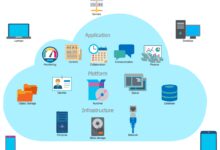
Cloud computing refers to the delivery of computing services—including servers, storage, databases, networking, software, analytics, and intelligence—over the internet (“the cloud”) to offer faster innovation, flexible resources, and economies of scale. Instead of buying, owning, and maintaining physical data centers and servers, organizations can access technology services on an as-needed basis from a cloud provider.
Core Components of Cloud Computing
The foundation of cloud computing rests on several key components that work together to deliver seamless digital experiences. These include computing power, storage, networking, and software platforms, all accessible via the internet.
- Compute Resources: Virtual machines (VMs), containers, and serverless functions that run applications.
- Storage: Scalable data storage solutions like object, block, and file storage (e.g., Amazon S3, Google Cloud Storage).
- Networking: Virtual networks, firewalls, load balancers, and content delivery networks (CDNs) that ensure fast and secure data transfer.
How Cloud Computing Works
Cloud computing operates on a shared infrastructure model. Providers like Amazon Web Services (AWS), Microsoft Azure, and Google Cloud Platform (GCP) maintain vast data centers worldwide. Users access these resources remotely via the internet, paying only for what they use.
“The cloud is not about technology; it’s about business agility and innovation.” — Satya Nadella, CEO of Microsoft
This pay-as-you-go model eliminates upfront capital expenses and allows businesses to scale up or down based on demand. Behind the scenes, virtualization technology partitions physical servers into multiple virtual environments, maximizing efficiency and resource utilization.
Types of Cloud Computing Services
Cloud computing is categorized into three primary service models: Infrastructure as a Service (IaaS), Platform as a Service (PaaS), and Software as a Service (SaaS). Each offers different levels of control, flexibility, and management, catering to diverse business needs.
Infrastructure as a Service (IaaS)
IaaS provides the foundational layer of cloud computing—virtualized computing resources over the internet. It gives users control over operating systems, storage, and deployed applications, while the cloud provider manages the underlying hardware.
- Examples include AWS EC2, Microsoft Azure Virtual Machines, and Google Compute Engine.
- IaaS is ideal for businesses needing full control over their IT infrastructure without the burden of physical hardware.
- It supports disaster recovery, backup solutions, and high-performance computing (HPC).
With IaaS, companies can spin up thousands of virtual servers in minutes, enabling rapid development and deployment cycles. This flexibility is especially valuable for startups and enterprises undergoing digital transformation.
Platform as a Service (PaaS)
PaaS offers a development environment over the internet, allowing developers to build, test, deploy, and manage applications without worrying about the underlying infrastructure. The provider handles servers, storage, networking, and even operating systems.
- Popular PaaS platforms include Google App Engine, Heroku, and Microsoft Azure App Services.
- Developers can focus on coding and innovation, while the cloud provider manages scaling, patching, and maintenance.
- PaaS accelerates time-to-market for new applications and supports microservices architecture.
This model is particularly beneficial for agile development teams working on complex, scalable applications. It enables continuous integration and continuous delivery (CI/CD), fostering collaboration and faster iteration.
Software as a Service (SaaS)
SaaS delivers software applications over the internet on a subscription basis. Users access the software via a web browser, eliminating the need for installation, maintenance, or updates.
- Common examples include Google Workspace, Microsoft 365, Salesforce, and Dropbox.
- SaaS applications are ready-to-use, scalable, and accessible from any device with an internet connection.
- They reduce IT overhead and simplify user management through centralized administration.
SaaS has revolutionized how businesses use software, shifting from perpetual licenses to flexible, usage-based pricing. It empowers remote workforces and ensures users always have access to the latest features and security updates.
Deployment Models in Cloud Computing
Cloud computing can be deployed in several ways, depending on organizational needs, security requirements, and compliance regulations. The four main deployment models are public cloud, private cloud, hybrid cloud, and multi-cloud.
Public Cloud
The public cloud is owned and operated by third-party cloud service providers who deliver computing resources over the internet. These resources are shared among multiple organizations (tenants).
- Major providers include AWS, Microsoft Azure, and Google Cloud.
- Public clouds offer high scalability, cost-efficiency, and rapid deployment.
- They are ideal for web-based applications, data analytics, and development environments.
Because the infrastructure is shared, public clouds are generally more affordable than private solutions. However, organizations must carefully evaluate data privacy and regulatory compliance when using public cloud services.
Private Cloud
A private cloud is dedicated to a single organization and can be hosted on-premises or by a third-party provider. It offers greater control, security, and customization compared to public clouds.
- Private clouds are often used by government agencies, financial institutions, and healthcare providers.
- They support strict compliance requirements such as HIPAA, GDPR, and PCI-DSS.
- While more expensive, they provide predictable performance and enhanced data sovereignty.
Private clouds are suitable for workloads requiring high levels of security, regulatory compliance, or specialized configurations. They can be built using technologies like VMware, OpenStack, or Microsoft Hyper-V.
Hybrid Cloud
The hybrid cloud combines public and private cloud environments, allowing data and applications to be shared between them. This model offers greater flexibility and optimization of existing infrastructure.
- Organizations can run sensitive workloads on private clouds while leveraging public clouds for scalability during peak demand.
- Hybrid clouds support seamless data migration, disaster recovery, and workload portability.
- Tools like AWS Outposts, Azure Stack, and Google Anthos enable consistent management across environments.
According to a 2023 IBM report, over 70% of enterprises now use hybrid cloud strategies to balance cost, performance, and security.
Key Benefits of Cloud Computing
Cloud computing has transformed how businesses operate, offering a wide range of advantages that drive efficiency, innovation, and competitiveness. From cost savings to global scalability, the benefits are compelling and far-reaching.
Cost Efficiency and Reduced Capital Expenditure
One of the most significant advantages of cloud computing is its cost-effectiveness. Traditional IT infrastructure requires substantial upfront investment in hardware, software, and data centers. Cloud computing shifts this to an operational expense (OpEx) model.
- Organizations pay only for the resources they use, avoiding over-provisioning.
- No need to purchase, maintain, or upgrade physical servers.
- Automatic scaling ensures optimal resource utilization and cost control.
This pay-per-use model is especially beneficial for startups and small businesses with limited budgets. It levels the playing field, allowing smaller players to access enterprise-grade technology.
Scalability and Flexibility
Cloud computing enables businesses to scale resources up or down instantly based on demand. Whether handling a sudden traffic spike or expanding into new markets, the cloud adapts in real time.
- Auto-scaling features automatically adjust computing power during peak hours.
- Global content delivery networks (CDNs) ensure fast performance regardless of user location.
- Flexible deployment options support agile development and rapid innovation.
This elasticity is crucial for e-commerce platforms, media streaming services, and SaaS providers that experience variable workloads.
Disaster Recovery and Business Continuity
Data loss and downtime can be catastrophic for businesses. Cloud computing provides robust disaster recovery (DR) and backup solutions that are faster, more reliable, and less expensive than traditional methods.
- Automated backups and replication across multiple geographic regions ensure data resilience.
- Cloud-based DR solutions reduce recovery time objectives (RTO) and recovery point objectives (RPO).
- Organizations can restore operations quickly after outages, cyberattacks, or natural disasters.
For example, Microsoft Azure Site Recovery enables seamless failover and failback of virtual machines, minimizing business disruption.
Cloud Computing and Digital Transformation
Cloud computing is a cornerstone of digital transformation, enabling organizations to modernize legacy systems, adopt new technologies, and deliver superior customer experiences. It serves as the foundation for innovation in areas like artificial intelligence, big data, and the Internet of Things (IoT).
Enabling AI and Machine Learning
Cloud platforms provide the computational power and data storage needed to train and deploy AI and machine learning models at scale. Major cloud providers offer pre-built AI services that simplify development.
- AWS SageMaker, Google AI Platform, and Azure Machine Learning offer end-to-end tools for data scientists.
- These platforms support data preprocessing, model training, deployment, and monitoring.
- Businesses can leverage AI for predictive analytics, chatbots, image recognition, and personalized recommendations.
For instance, Netflix uses cloud-based machine learning to analyze viewing patterns and recommend content, enhancing user engagement and retention.
Supporting Big Data Analytics
The cloud enables organizations to collect, store, and analyze massive volumes of data from diverse sources. Cloud-based data lakes and analytics platforms make it easier to derive actionable insights.
- Tools like Amazon Redshift, Google BigQuery, and Snowflake run on cloud infrastructure for high-speed querying.
- Real-time analytics allow businesses to monitor performance, detect anomalies, and make data-driven decisions.
- Cloud analytics reduce the complexity and cost of managing on-premises data warehouses.
According to a Gartner study, over 90% of enterprises will rely on cloud-based analytics by 2025 to gain competitive intelligence.
Facilitating IoT Integration
The Internet of Things generates vast amounts of data from connected devices. Cloud computing provides the infrastructure to ingest, process, and store this data efficiently.
- Cloud platforms like AWS IoT Core and Azure IoT Hub manage device connectivity and data flow.
- Edge computing combined with cloud processing enables real-time decision-making in smart cities, manufacturing, and healthcare.
- Cloud-based dashboards visualize IoT data for monitoring and control.
For example, smart factories use cloud-connected sensors to monitor equipment health, predict maintenance needs, and reduce downtime.
Security and Compliance in Cloud Computing
Security remains a top concern for organizations adopting cloud computing. While the cloud offers advanced security features, it also introduces new risks that must be managed through proper policies, tools, and practices.
Shared Responsibility Model
Cloud security operates on a shared responsibility model: the cloud provider secures the infrastructure, while the customer is responsible for securing their data, applications, and access controls.
- Providers secure physical data centers, network infrastructure, and hypervisors.
- Customers must configure firewalls, encrypt data, manage identities, and apply security patches.
- Understanding this division is critical to avoiding security gaps.
For example, AWS provides detailed documentation on its Shared Responsibility Model, helping customers understand their security obligations.
Data Encryption and Identity Management
Protecting data in transit and at rest is essential in cloud computing. Encryption and robust identity management are key defenses against unauthorized access.
- Transport Layer Security (TLS) encrypts data moving between users and cloud services.
- Advanced Encryption Standard (AES-256) protects stored data.
- Identity and Access Management (IAM) systems control who can access resources and what actions they can perform.
Multi-factor authentication (MFA), role-based access control (RBAC), and single sign-on (SSO) further enhance security posture.
Compliance and Regulatory Standards
Cloud providers offer compliance certifications for various industries and regions, helping organizations meet legal and regulatory requirements.
- AWS, Azure, and GCP are compliant with GDPR, HIPAA, SOC 2, ISO 27001, and more.
- Cloud audit logs and monitoring tools support compliance reporting and forensic investigations.
- Organizations must still conduct their own assessments and ensure configurations align with standards.
For healthcare providers, using a HIPAA-compliant cloud environment ensures patient data is protected under U.S. law.
Challenges and Risks of Cloud Computing
Despite its many benefits, cloud computing presents challenges that organizations must address to maximize value and minimize risk. These include vendor lock-in, performance variability, and data sovereignty issues.
Vendor Lock-In and Interoperability
Organizations that heavily rely on a single cloud provider’s proprietary tools and services may find it difficult to migrate to another platform later.
- Proprietary APIs, data formats, and management tools can create dependency.
- Multi-cloud and hybrid strategies can reduce reliance on a single vendor.
- Using open standards and containerization (e.g., Kubernetes) improves portability.
To mitigate lock-in, businesses should design applications with portability in mind and regularly evaluate alternative providers.
Performance and Latency Issues
While cloud computing offers high performance, latency can become an issue for applications requiring real-time processing or serving users in remote locations.
- Distance between users and data centers affects response times.
- Edge computing and CDN integration help reduce latency.
- Proper resource provisioning and monitoring ensure consistent performance.
For example, online gaming and financial trading platforms often use edge computing to process data closer to end-users.
Data Privacy and Sovereignty
Data sovereignty refers to the legal jurisdiction under which data is stored and processed. Different countries have varying data protection laws, complicating cross-border cloud operations.
- GDPR in Europe requires that EU citizen data be handled according to strict privacy rules.
- Some governments mandate that sensitive data remain within national borders.
- Cloud providers offer region-specific data centers to comply with local regulations.
Organizations must carefully choose where their data is stored and ensure their cloud strategy aligns with legal requirements.
Future Trends in Cloud Computing
The cloud computing landscape is continuously evolving, driven by technological advancements and changing business needs. Emerging trends like serverless computing, edge computing, and green cloud initiatives are shaping the next generation of cloud services.
Serverless Computing and Function-as-a-Service (FaaS)
Serverless computing allows developers to run code without managing servers. The cloud provider automatically allocates resources and scales the application based on demand.
- AWS Lambda, Azure Functions, and Google Cloud Functions are leading FaaS platforms.
- Developers focus solely on writing code, while the cloud handles execution, scaling, and patching.
- Serverless reduces operational overhead and costs, charging only for execution time.
This model is ideal for event-driven applications like file processing, chatbots, and real-time data transformation.
Edge Computing and 5G Integration
Edge computing brings data processing closer to the source—such as IoT devices, sensors, or user devices—reducing latency and bandwidth usage.
- Combined with 5G networks, edge computing enables ultra-fast, low-latency applications.
- Use cases include autonomous vehicles, augmented reality, and smart cities.
- Cloud providers are expanding edge networks to support distributed computing.
For example, AWS Wavelength and Azure Edge Zones integrate cloud services directly into 5G networks for real-time processing.
Sustainable and Green Cloud Initiatives
As environmental concerns grow, cloud providers are investing in sustainable data centers powered by renewable energy.
- Google Cloud aims to run on 24/7 carbon-free energy by 2030.
- Microsoft Azure is committed to being carbon negative by 2030.
- Efficient cooling systems, AI-driven energy management, and hardware recycling reduce environmental impact.
Sustainable cloud computing not only benefits the planet but also enhances brand reputation and meets regulatory expectations.
What is cloud computing?
Cloud computing is the delivery of computing services—such as servers, storage, databases, networking, software, and analytics—over the internet. It allows businesses to access technology on-demand without owning physical infrastructure.
What are the main types of cloud services?
The three main types are Infrastructure as a Service (IaaS), Platform as a Service (PaaS), and Software as a Service (SaaS). IaaS provides virtualized resources, PaaS offers development platforms, and SaaS delivers ready-to-use software applications.
Is cloud computing secure?
Yes, cloud computing can be highly secure when proper measures are taken. Cloud providers implement advanced security protocols, but users must also manage access controls, encryption, and compliance to protect their data.
What is the difference between public and private cloud?
A public cloud is shared among multiple organizations and managed by a third-party provider, while a private cloud is dedicated to a single organization, offering greater control and security.
How does cloud computing support digital transformation?
Cloud computing enables digital transformation by providing scalable infrastructure for AI, big data analytics, IoT, and agile development. It accelerates innovation, improves customer experiences, and reduces time-to-market for new products.
Cloud computing has revolutionized the way organizations operate, offering unprecedented flexibility, scalability, and innovation. From startups to global enterprises, businesses are leveraging the cloud to reduce costs, enhance security, and drive digital transformation. As technology evolves, trends like serverless computing, edge networks, and sustainable practices will shape the future of cloud services. By understanding the benefits, challenges, and best practices, organizations can harness the full power of cloud computing to stay competitive in a rapidly changing world.
Further Reading:
